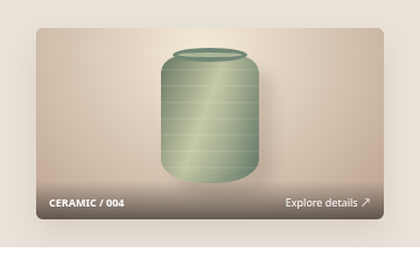
Macro Detail Band
A narrow band of magnified detail crosses a product photograph to show texture.
A narrow band of magnified detail crosses a product photograph to show texture.
Live Demo
Hover over the element or use Tab to focus.
Source Code
Copy the HTML, CSS or JavaScript you need for your project.
HTML
<div class="tbx-1245"><a class="photo" href="#product" aria-label="View ceramic product details"><span class="scene"><span class="vase"></span><span class="shadow"></span></span><span class="zoom"><span class="vase"></span><span class="label">MACRO VIEW / texture</span></span><span class="caption"><b>CERAMIC / 004</b><span>Explore details ↗</span></span></a></div>CSS
.tbx-1245{box-sizing:border-box;display:flex;align-items:center;justify-content:center;width:100%;max-width:100%;min-height:212px;overflow:hidden;padding:16px;font-family:system-ui,-apple-system,"Segoe UI",sans-serif;color:#193647;}
.tbx-1245 *, .tbx-1245 *::before,.tbx-1245 *::after{box-sizing:border-box}
.tbx-1245{background:#e9e2d9}.tbx-1245 .photo{display:block;position:relative;width:min(100%,298px);height:164px;overflow:hidden;border-radius:6px;background:#c8b39e;text-decoration:none;box-shadow:0 12px 23px #6c554420}.tbx-1245 .scene{position:absolute;inset:0;background:radial-gradient(ellipse at 48% 12%,#f4ead8,#bba28f);display:flex;align-items:center;justify-content:center}.tbx-1245 .vase{position:absolute;width:84px;height:110px;left:50%;top:23px;transform:translateX(-50%);background:repeating-linear-gradient(0deg,transparent 0 12px,#ffffff19 13px 14px),linear-gradient(110deg,#6c7a66,#c5c8a5 45%,#718571);border-radius:24% 24% 44% 44%/14% 14% 18% 18%;box-shadow:inset -12px 0 18px #2a423e2c,12px 12px 12px #654f4430}.tbx-1245 .vase::before{content:"";position:absolute;top:-6px;left:10px;right:10px;height:12px;background:#aeb69a;border:4px solid #708676;border-radius:50%}.tbx-1245 .zoom{position:absolute;left:0;right:0;top:47px;height:66px;overflow:hidden;border-block:2px solid #fff;transform:scaleY(0);transition:transform .43s cubic-bezier(.2,.8,.2,1);background:#bcaa95;transform-origin:center}.tbx-1245 .zoom .vase{width:190px;height:235px;top:-65px}.tbx-1245 .zoom .label{position:absolute;right:8px;bottom:5px;background:#172d30d9;color:#fff;font-size:9px;padding:4px 6px;letter-spacing:.06em}.tbx-1245 .caption{position:absolute;left:0;right:0;bottom:0;display:flex;justify-content:space-between;gap:5px;padding:12px 11px 8px;color:white;background:linear-gradient(transparent,#2f2a29a8);font-size:9px}.tbx-1245 .photo:is(:hover,:focus-visible) .zoom{transform:scaleY(1)}
@media(prefers-reduced-motion:reduce){.tbx-1245 *, .tbx-1245 *::before, .tbx-1245 *::after{{transition-duration:0.01ms!important;animation-duration:0.01ms!important;scroll-behavior:auto!important}}}
How to Use
Insert the HTML and add the CSS to your stylesheet. Adjust colors and sizes and avoid class conflicts.
Use Case
Useful for image galleries and product showcases.
Technical Notes
Keep controls usable on touch devices. Test keyboard focus and reduced-motion preferences.
Mobile: Ensure the interactive content remains accessible without hover on touch devices.
Browser: Uses modern CSS. Check behavior in the browsers you support.
Reduced Motion: Check that prefers-reduced-motion is respected.